Generally, part of any face-to-face class is a discussion of the issues surrounding the topics covered in that unit or week. Since you are not together as a class to do this, the discussion takes place asynchronously using written postings to the Discussion Board.
In many respects, the Discussion Board is very similar to email, except that it is generally automatically posted to everyone in the class. If you understand how email works, you will understand how the discussion board functions.
Click on the Discussion Board icon to enter the discussion area. You will see that the course is divided into weeks.
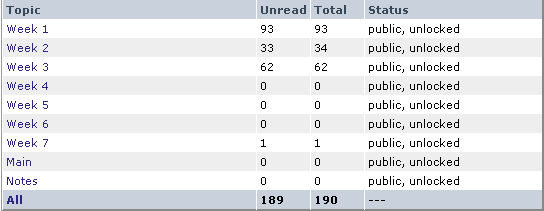
You can click on each week and see the messages within that week. This will help keep the materials you and your classmates post organized by topic. When you click on Week 1, you will see something similar to the following:
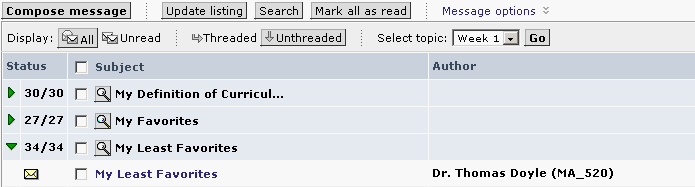
Note the green triangle in the first column. If the arrow is pointed right, the "file folder" of postings is closed. If you click on the green triangel, it will point down, and list all the messages under that topic. Notice on the image below that if you put your curser over a message, it will appear as an underlined link. Clicking on it when underlined (and your curser has become a hand) will open that message.
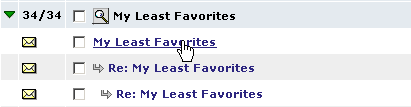
To read a messge, click on the title of the message. If you click on the first message above, My Educational Philosophy, you will see the following:
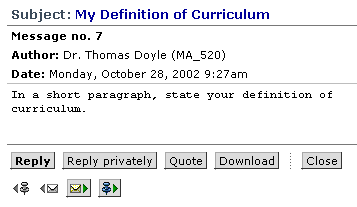
When you are ready to respond to this post, you should click on Reply.

You can enter your message into the form either typing it directly into the box or using cut and paste from a prepared document. When you have completed your writing, click on Post to send the message to the Discussion Board for all to read.
There are several options to posting besides Reply. You can Reply Privately which replys only to the sender not the entire class, Quote which puts the message you are responding to into your reply automatically, or Download, which allows you to create a copy of that message on your hard drive. You can also attach files to the message, such as Word documents or PowerPoint presentations.
For some weeks, as is the case for Week 1, the topic message is already posted and you just need to read it and respond. For other weeks, you will be creating the topic and posting. The process is very similar. Look at Week 3, the first time this occurs. To do the posting for Week 3, you need to click on the underlined Week 3 on the menu, as indicated with the blue box below.
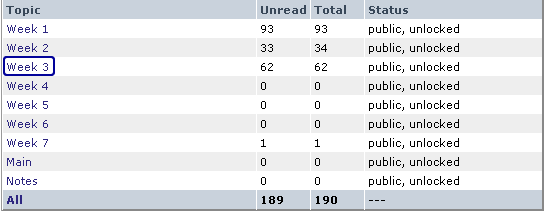
Clicking on Week 3 will bring up the following:

Click on Compose
message. You will see that the form looks identical to the
Reply form, except that the Subject line is blank. You need to supply
the subject as directed in the lesson. Then follow the same steps as
replying to a posted message.
(return to Top)
Threaded Discussion Etiquette - Concordia University encourages frank and insightful dialogue in all of its online courses. Diversity has many manifestations including diversity of thought, opinion and values. We encourage all learners to be respectful of that diversity and to refrain from inappropriate commentary. Comments on the discussion board should be guided by common sense and basic etiquette. The following are good guidelines to follow:
- Never post, transmit, promote or distribute content that is known to be illegal.
- Avoid overtly harassing or embarrassing fellow learners. If you disagree with someone, respond to the subject of the discussion, not the person.
- Refrain from transmitting or distributing content that is harmful, abusive, racially or ethnically offensive, vulgar, or otherwise inappropriate.
- Remember that there are no anonymous postings.
Participation - Students are expected to complete assigned readings early in the week and participate in discussions on scheduled days. Specifically, students must spend about an hour on each of three different days each week participating in threaded discussions (at any times you choose on those days – and yes, because it is so critical to your success in this class, participation is monitored).
Each week you will find several different postings as part of your learning process. You must make an initial posting and at least one response to one other student’s posting for each question. You can make multiple responses to the same question after your initial response, but it is usually better to engage in discussion of more than one question. The length of your initial posting and your responses should seldom exceed one screen. Depending on the course, your professor will specify how many postings are required.
Rating Scale - Your instructor will assess the quality of your contributions to the weekly asynchronous discussions. Please see the scoring rubric listed below to review the criteria.
|
THREADED DISCUSSION |
|||||
|
CRITERIA (The responses) |
Point Values |
||||
The Responses |
|||||
|
Adequately answered the discussion question |
5 |
4 |
3 |
2 |
1 |
|
Were consistently coherent, cohesive, and clear |
5 |
4 |
3 |
2 |
1 |
|
Demonstrated mastery of the subject matter covered by the question |
5 |
4 |
3 |
2 |
1 |
|
Generally exhibited correct and appropriate grammar, punctuation, spelling, syntax, and word usage |
5 |
4 |
3 |
2 |
1 |
|
Total: /20 |
|||||
|
Please note: Posting ends at the end of that particular week’s topic. No new posts submitted after that time will apply toward meeting the posting requirements. However, members may access previous threads throughout the term of the course. |
|||||
Please note that your responses to the postings of others are not just "Well done" or "I agree". Just as in a face-to-face class where the professor expects quality, thoughtful answers, so, too, should your comments online be of the same quality.
Scoring Standards - You must achieve a rating of at least "3" on each criterion to demonstrate competency in posting responses to unit discussion questions and posting. Below are the standards corresponding the the grading number.
5:
Responses exceeded criterion
4: Responses met criterion
3: Responses met criterion at a basic level of skill
2: Responses did not meet criterion
1:
Responses were missing, incomplete, or incorrect