| |
| Chat is a typed
or spoken interchange between class members and their instructor on a set
date and time. Concordia uses two different types of chat. The first is
text based chat. The second is a form of Voice over IP (VoIP) that uses
the internet to conduct a conference call similar to what you would do over
the telephone. The professor will have you use one or the other, depending
on the professor's preference and the content of the course. |
|
| Text chat is very
similar to instant messaging or any other chat room. It is a synchronous
meeting of students and instructor for instruction, presentations, or comment
about the course. You will be assigned a chat time by your instructor. Generally,
these chat groups are eight or less in number to encourage active participation. |
| |
The text chat can
be found under the Communication Tools. Once in Communication
Tools, click on the Chat icon to enter the Chat area. In
order for Chat to work, you need to have Java enabled on your computer.
If you are uncertain, go to the Access & Login
area of this course. The first two paragraphs have links to Browser Settings
to help you set up your computer correctly. |
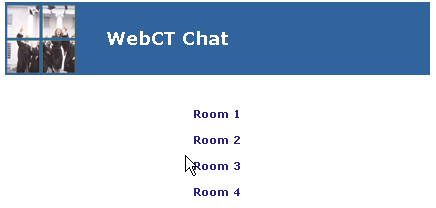
When you first
enter the chat room area, you will see a choice of at least four rooms.
Sometimes they are numbered and other times they will have the day and
time of your chat. Click on the appropriate room as assigned by your
instructor. This will bring up a window similar to the one pictured
below. If the window does not load, you do not have Java properly enabled.
|
|
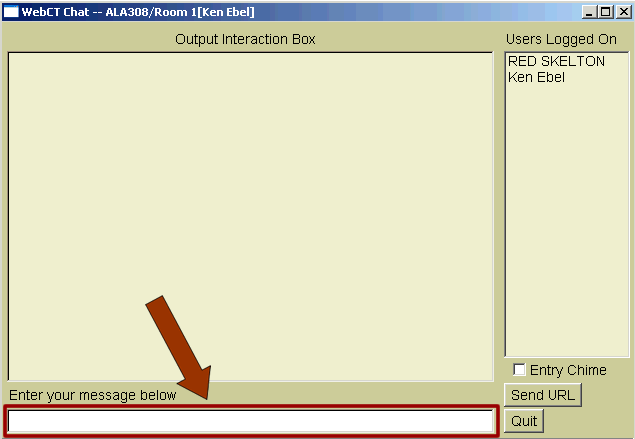
| On the right side
you will see a list of the participants in the chat. To send a message,
type your message into the area outlined in red above. When you are done
typing, press the Enter key on your keyboard to post the message. |
|
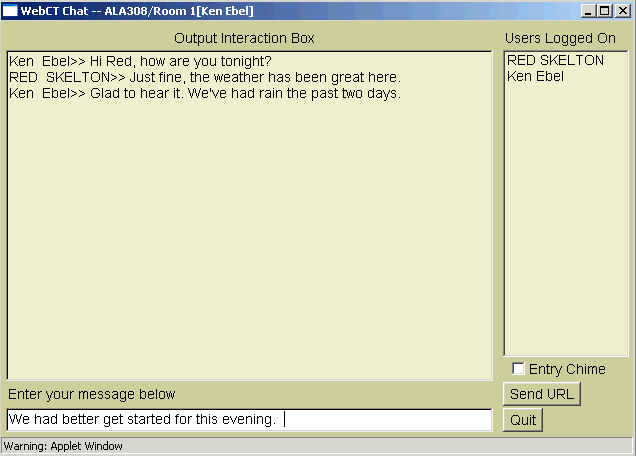
| As the messages
are posted, you will see them appear in the large gray area on the screen.
You can follow the "conversation" as the comments are made. Occasionally,
and ISP (generally true only for dial-up connections) will bump you off
if it does not feel you are actively using the connection. If that is the
case, periodically post a period (.) to the list to keep the connection
active. |
For most classes,
transcripts in the form of Word documents will be posted the day after the
chat is complete. You can download the transcript to review what was said.
(Return to Top) |
|